Coding agents are terminal applications. You launch one, work inside it, and when you're done you close it. There's no window, no sidebar, no session list. Every conversation is a process. If you want to go back to something from yesterday, you scroll through shell history or hope you remember what directory you were in.
That works fine for a while. Then you start running multiple sessions across different projects. Then you start running multiple agents: Claude Code on one branch, Codex on another, Cursor on a third because each one has different strengths. You lose track of which one had the conversation about the migration. You forget which branch you were on when you ran that last refactor. You want to check if the dev server is still running alongside a session but your terminal tabs are a mess.
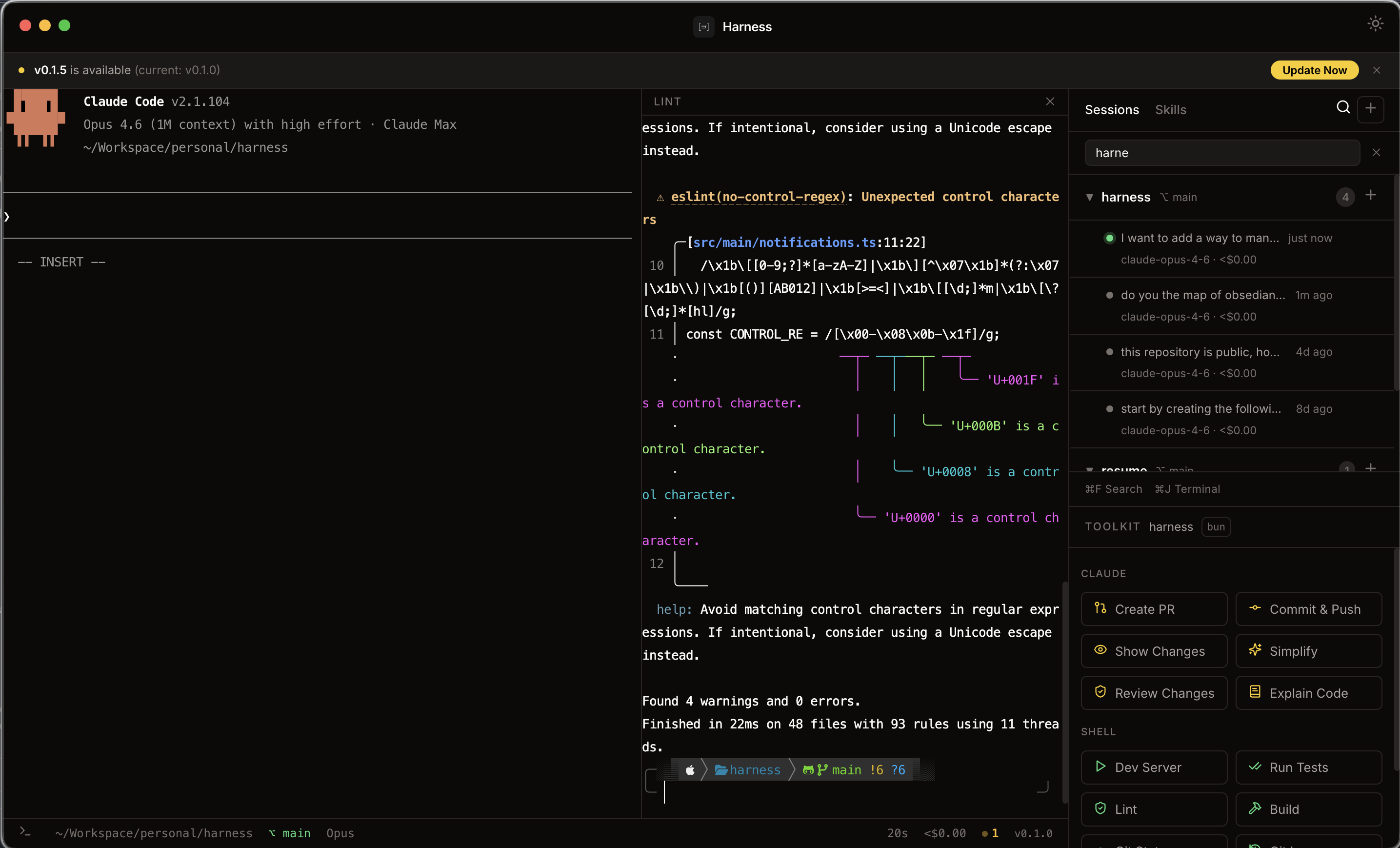
Harness is a desktop app I built to solve this. It wraps Claude Code, Codex, and Cursor in an Electron shell that gives you a persistent sidebar of all your sessions across all three CLIs, an embedded terminal with split panes, and a set of quick actions for the things I do fifty times a day: creating PRs, committing, reviewing diffs, editing skills and instructions files.
A provider dropdown in the title bar lets you switch between Claude, Codex, and Cursor. The session list and Skills tab follow whichever provider is active. If a provider isn't installed, Harness offers to install it inline.
How agents store sessions
To understand what Harness does, it helps to know that each CLI keeps its own session store on disk, in its own format. Harness reads them directly, with no daemons and no forks of the CLIs.
~/.claude/                                Claude Code
├── sessions/{pid}.json                     running process markers
└── projects/{slug}/{id}.jsonl              conversation history (JSONL)

~/.codex/                                 Codex CLI
└── sessions/YYYY/MM/DD/rollout-*.jsonl     per-session rollouts (session_meta line has id/cwd)

~/.cursor/                                Cursor CLI
├── projects/{hyphenated-path}/             workspaces Cursor has touched
└── chats/{md5(cwd)}/{chatId}/store.db      per-chat SQLite store
Three different shapes: Claude pairs PID-keyed JSON markers with per-project JSONL history, Codex writes one rollout file per session under a date-partitioned tree, and Cursor stores each chat as a SQLite database keyed by an MD5 of the working directory. Harness reads all three, groups sessions by project, and presents them in a unified list. The first user message in each conversation becomes the session label, so you can actually find things.
The app polls every 5 seconds via TanStack Query for the active provider's sessions: it checks which PIDs are alive for Claude, reads rollout metadata in parallel for Codex, and shells out to sqlite3 per chat for Cursor. Click a past session and Harness resumes it in the embedded terminal with the right command for that provider: claude --resume, codex resume, or agent --resume.
Architecture
The app is an Electron 32 application with a frameless macOS window. The main process handles all the heavy lifting: PTY management via node-pty, per-provider session readers (filesystem for Claude and Codex, SQLite for Cursor), project detection, config file watching for skills and agents, and auto-update checking. The renderer is a React 18 app that drives the UI with xterm.js for terminal emulation (WebGL addon for performance) and TanStack Query for state synchronization.
The two processes communicate over IPC. When you click "resume" on a session in the sidebar, the renderer tells the main process to spawn a new PTY for the active provider's resume command. The main process manages the lifecycle, pipes stdout/stderr back over IPC, and the renderer feeds it into an xterm.js instance. To dodge weirdness with PTY-spawned shells (Powerlevel10k instant prompt, in particular), provider commands run through zsh -ic as shell arguments rather than being written to stdin.
Main Process (Node.js)          Renderer (React)
├── PTY via node-pty            ├── xterm.js + WebGL
├── Session file I/O            ├── TanStack Query
├── Config file watcher         ├── Skills editor
├── Attention detection         ├── Notification UI
└── Auto-updater                └── Update prompts
The notification system is worth mentioning. Harness watches for terminal activity and can send desktop notifications with badges and audio cues when a session needs attention. Useful when you kick off a long task and switch to something else.
Package manager detection
When you open a project, Harness scans for lockfiles to detect whether you're using npm, yarn, pnpm, or bun. This matters for the split-pane terminal: you can run a dev server or build command alongside your Claude session, and Harness picks the right package manager automatically. It's a small thing but it removes friction when you switch between projects that use different tools.
Skills, agents, and instruction files
Each agent reads instructions from a bunch of files scattered across its config directory and each project. Claude has skills, agents, slash commands, and CLAUDE.md. Codex has skills under ~/.codex/skills/ and AGENTS.md. Cursor has skills under ~/.cursor/skills-cursor/ and its own AGENTS.md. Editing them normally means remembering where they live and opening them in your editor one by one.
The Skills tab follows the active provider. It lists every global and project-scoped entry (skills, agents and commands for Claude, plus the top-level instructions file) with a built-in editor that handles frontmatter and body. A file watcher invalidates the list when something changes on disk, so edits from other tools show up immediately. Cmd+S saves the open entry without leaving the keyboard.
Quick actions
The sidebar includes a set of buttons that send pre-built commands to the active session. Things like "create a PR," "commit changes," "show diff," and "review code." These are the commands I was typing manually dozens of times a day. They route to whichever provider is active, so the same one-click "create PR" works in a Claude session, a Codex session, or a Cursor session.
Installation
Harness runs on macOS 14 or newer (Apple Silicon and Intel). You need at least one of Claude Code (claude), Codex CLI (codex), or Cursor CLI (agent) on your PATH. If a provider isn't installed, the app offers to install it inline from the title bar dropdown. Install Harness itself with:
curl -fsSL https://raw.githubusercontent.com/magidmroueh/harness/main/install.sh | bashThe script downloads the latest release DMG, mounts it, and copies the app to /Applications. You can also grab the DMG directly from the releases page.
The app checks for updates at startup and every 4 hours. When a new version is available, you get a banner. Running the same curl command again updates to the latest release.
Building from source
If you want to hack on it or run the development build:
git clone https://github.com/magidmroueh/harness.git
cd harness
bun install
bun run rebuild   # recompile native modules for Electron
bun run dev       # hot-reload development environment
The rebuild step is important because node-pty has native bindings that need to match your Electron version. Skip it and you'll get cryptic segfaults. Other useful commands: bun run pack creates a local .app, bun run dist generates the DMG and ZIP for distribution.
Code quality is handled by oxlint and oxfmt, the Rust-based alternatives to ESLint and Prettier. They're fast enough that linting the whole project takes under a second.
Keyboard shortcuts
A couple of shortcuts that make navigation fast:
Release pipeline
Releases are fully automated. Every commit to main triggers a GitHub Actions workflow that builds the app, packages the DMG and ZIP, and creates a GitHub release with the compiled artifacts. To cut a new version, you bump the version field in package.json and merge. That's it.
Why Electron
The obvious question. Electron gets a bad reputation for resource usage, and it's fair. But for this use case it makes sense: the app needs real PTY access via node-pty, a WebGL-accelerated terminal renderer, and deep OS integration for notifications and window management. Tauri doesn't have native PTY support. A pure Swift app would mean reimplementing terminal emulation from scratch. Electron gives you all of this with xterm.js, which is battle-tested and fast.
The app uses a frameless window on macOS for a cleaner look, with custom title bar controls. Memory usage sits around 150-200MB, which is reasonable for what's essentially a terminal multiplexer with a session manager on top.
What's next
Harness is open source under MIT. I use it every day as my primary interface to Claude Code, Codex, and Cursor, bouncing between them depending on what each one is good at without losing track of any single conversation. If you spend a lot of time in agent sessions across multiple projects and providers, it might save you the same friction it saved me. The repo is on GitHub.